
BUILD 03
Automated Time Tracking
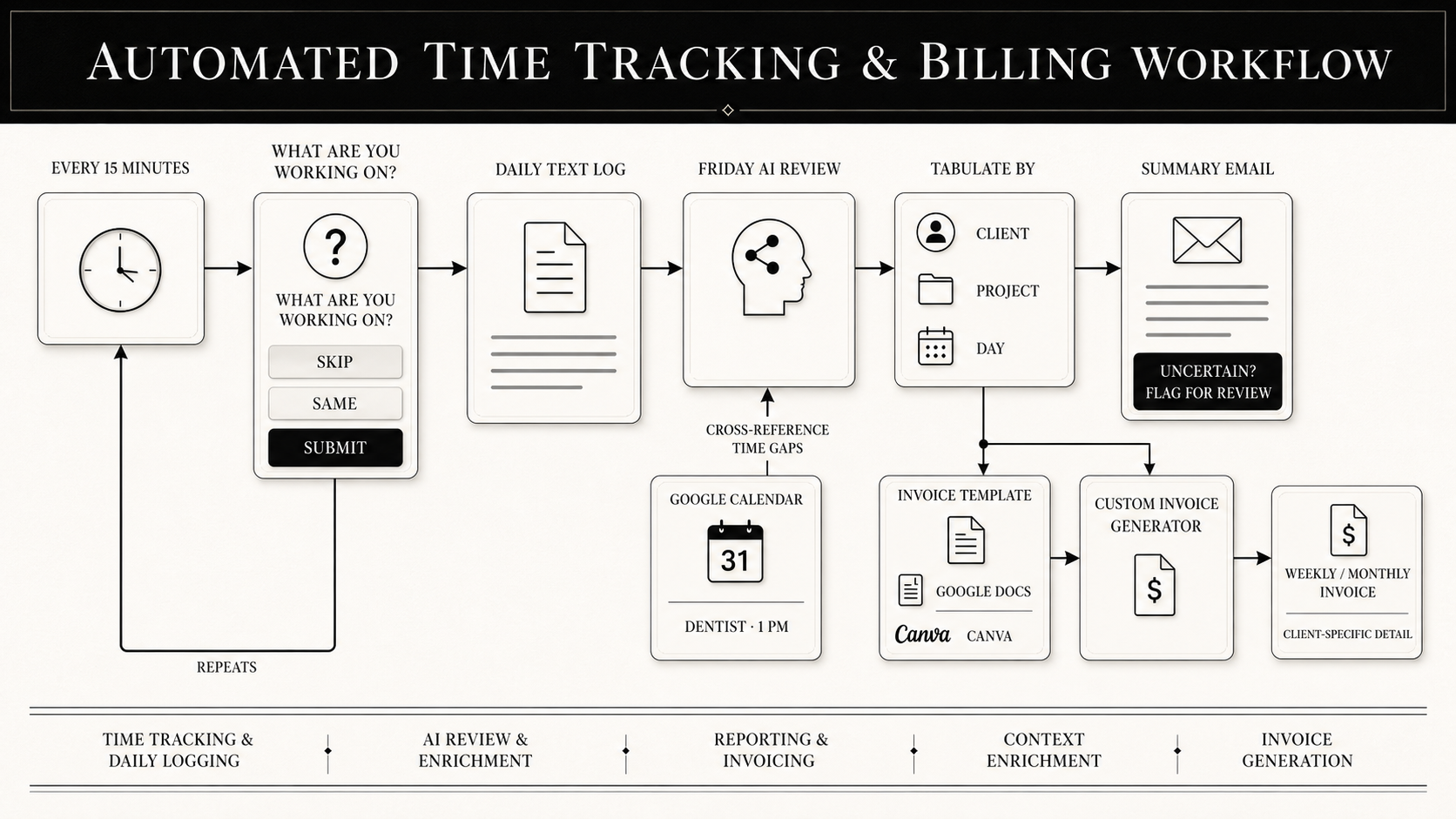
A system that captures what I'm working on every fifteen minutes, in one tap, and turns a week of fragments into a finished timesheet summary every Friday afternoon.
BUILT FOR
Personal time tracking
TYPE
Scheduled capture + AI summary
RUNS
Every 15 minutes, plus a Friday summary
STACK
Claude code (+ Google Calendar + Google Docs / Canva)
15 mins
how often it asks, so nothing has to be remembered later
1-2 hrs
of weekly reconstruction removed from Monday mornings
0
entries invented. - anything unclear gets flagged, not guessed
THE PROBLEM
I context-switch constantly. Across a day I'll move between four or five projects, and by Friday I genuinely cannot tell you what I spent Tuesday morning on.
With my chaotic days, filling in a timesheet became an archaeology exercise. Having to dig back through my inbox, my sent folder, my calendar, WhatsApp, Teams and call logs trying to reconstruct a week from the traces it left behind. One to two hours a week, spent producing something that was still, at best, an educated guess.
WHAT I BUILT
A system that captures the work as it happens instead of asking me to remember it afterwards.
01 —THE CAPTURE
Fifteen minutes, one tap
A prompt appears every fifteen minutes asking what I'm working on. Three buttons underneath: skip, same, submit. Two of the three require no typing at all because a time tracker that costs you thirty seconds an entry is a time tracker you abandon by Wednesday.
02 — THE LOG
Plain text, broken up by day
Every entry writes to a simple daily text log. No database, no app to open, nothing to maintain. The whole week accumulates quietly in the background whether I'm paying attention to it or not.
03 —THE SUMMARY
Friday afternoon, already done
A scheduled summary reads every log from the week, tabulates the fifteen-minute chunks, and groups them by day, client and project. It also learns how I write, and my shorthand for projects and clients gets more accurate the longer it runs.
04 — THE HONESTY
It asks instead of guessing
When the system isn't sure what an entry refers to, it lists it for clarification rather than filing it somewhere plausible. A timesheet full of confident guesses is worse than no timesheet — it's a billing problem. So it doesn't guess.
THE RECEIPTS
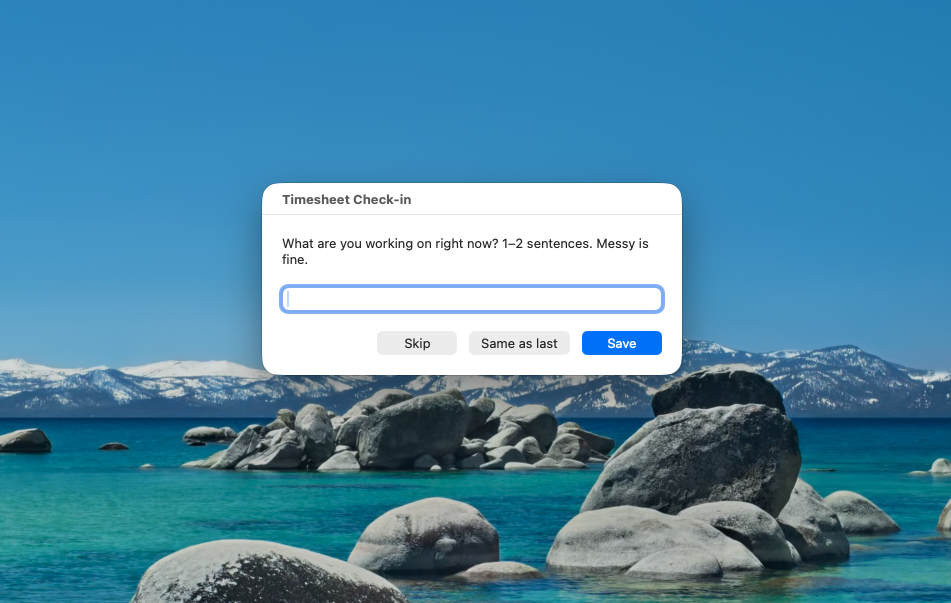
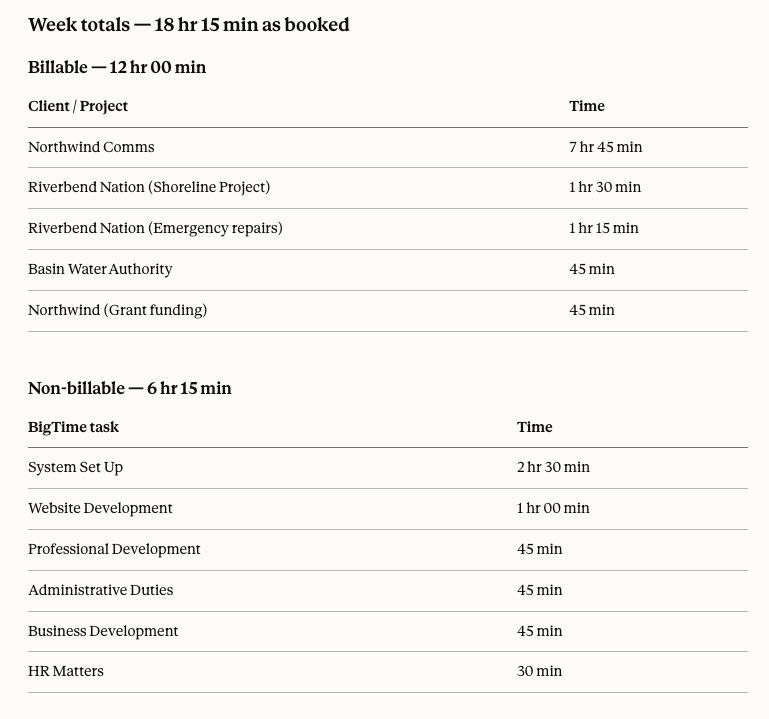
The problem was never that I forgot what I did.
It was that I was trying to remember on Friday what happened on Tuesday. Move the moment of capture and the problem stops existing.
WHY THIS IS HERE
Because it's the least impressive-sounding thing I've built and one of the most useful. Nobody's day gets ruined by a timesheet. It just quietly takes an afternoon a month and returns nothing.
That's the shape of most of the work worth automating. Not the dramatic problems, the boring recurring ones that everybody has quietly accepted.
It's also a deliberate example of where I stopped. I could give the system browser access and have it fill in the timesheet itself. I haven't, because I'm not yet confident enough in its read of my shorthand to let it submit something with my name on it unsupervised. Automating the last mile before the system has earned it is how you end up with a tool that's confidently wrong.
Bonus tip 1: Connect Google Calendar as a way to cross-reference meetings/appointments that could help explain missing chunks of time eg; dental appointment at 1pm would explain why there are missing entries between that time slot.
Bonus tip 2: Create a template in Google Docs / Canva, create a link to the template and have customized invoices generated at the end of every week / month with as little/much detail as you need for your client.
WHAT NEXT
Losing an afternoon a month to admin you can’t bill for
Book a twenty-minute call and I'll tell you straight what it would take, including if the honest answer is that you don't need to hire me for it.